
The Small Fixes in Flaevo 1.1.0 That Add Up
Some updates are one big feature. This one has two of them, Daily 3 and learning straight from the syllabus, and also a long list of small things that were quietly getting in your way.
None of these is exciting on its own. Together they are the difference between an app that feels solid and one that keeps catching you out. Here they are.
Typed answers are marked on meaning
When a question asks you to type the answer, Flaevo used to compare letters. Type "boys" when the key said "boy" and you were wrong. That is not what a teacher would do.
Now an answer that means the same thing counts:
- "3" for "three", "21" for "twenty-one", "0.5" for "1/2"
- "boy" for "boys", and "the mitochondria" for "mitochondria"
- any one of the answers the key allows, when it says "X or Y"
- a small slip in a long word: a letter dropped, added or swapped
For a slip, you are marked right and the correct spelling is shown, so you still learn it.
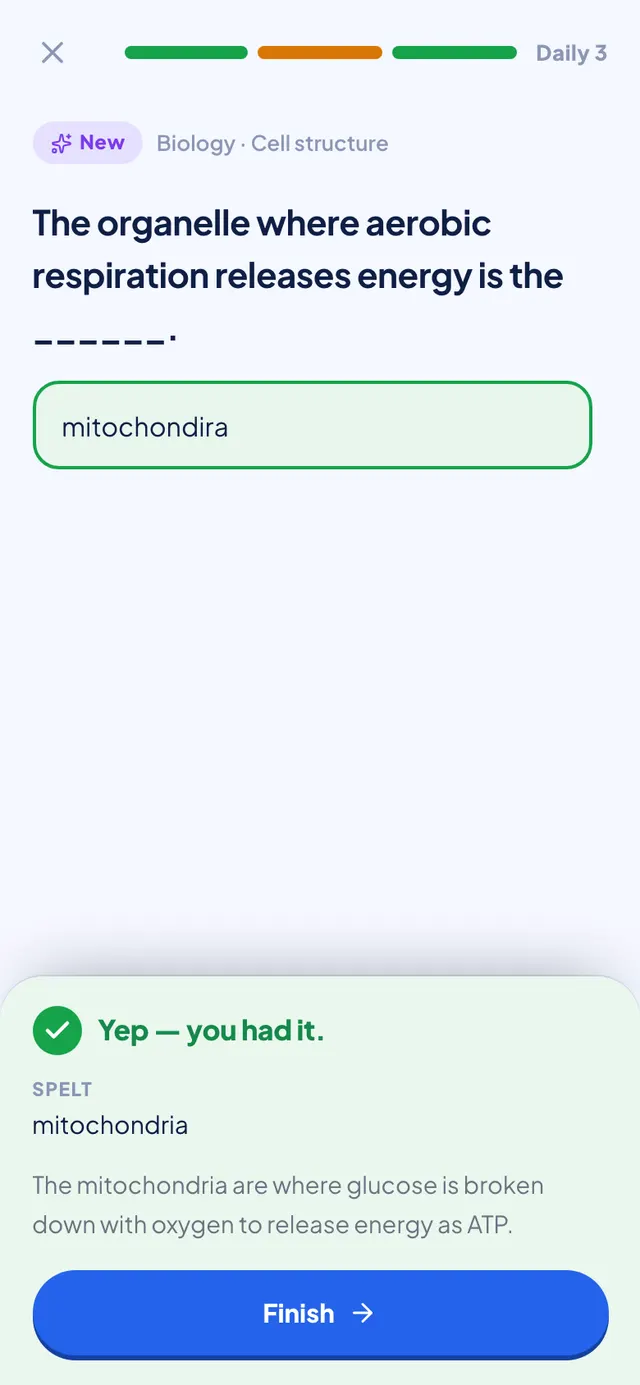
What it will not do is let a different answer through. Alkane is not alkene. Mitosis is not meiosis. A changed letter that makes a different word is still wrong, and so is a different number or a different formula. Being generous about spelling is only fair if it is strict about meaning.
This applies everywhere you type an answer: quizzes, Smart Review, Semester Review, Daily 3 and quizzes with friends.
The back button does what you expect
On Android, pressing back with a pop-up open now closes the pop-up, the way it does in every other app. Before, some sheets ignored it, and some took you off the page underneath instead.
Pressing back on Home now puts Flaevo in the background, instead of doing nothing.
A slow connection is not an offline one
Many of you study on mobile data that is slow rather than missing. When a screen opened, its first few requests could all time out together, and Flaevo would announce you were offline while your data was working fine.
Now a slow request counts as slow. The offline notice only appears when nothing is getting through at all, for example when your bundle has run out.
Signing out clears the phone
If you share a phone with a sibling or a friend, signing out now clears your saved data from that phone and cancels your reminders. The next person who signs in does not see your courses, your questions or your notifications.
We also tightened a few things behind the scenes that keep your account and your study data private.
A cleaner launch
Opening Flaevo from a notification, a widget or a shortcut used to show a plain blue screen, with no logo. Now you see the same launch screen however you open the app.
The brief white flash between the launch screen and Home is gone too.
Long-pressing the Flaevo icon now gives you Ask Flae, Review, Study and Flashcards. Before, one of the shortcuts opened a blank screen and another opened the wrong page.
Smaller things in Flae's chat
- Deep Thinking stopped blaming your network. While Flae was thinking through a hard question, the app sometimes showed "Network slow" even though the message had arrived. Now you see that she is thinking, and the network warning only shows when sending really is slow.
- Equations sit in the middle. Every standalone equation is centred, the way a textbook prints it.
- The text is bigger, and sending a message is smoother.
- The camera on Home sends your photo to Flae, the same as the camera inside the chat. Before, it went somewhere else and often failed.
Settings save themselves
Change a setting and it is saved. There is no Save button to forget.
A clearer Help Centre, and a What's new
The Help Centre in Settings has been redesigned, with articles for everything new in this update. And after an update, a What's new screen now shows what changed, once. You can open it again any time from Settings or your profile.
Getting it
All of this is in Flaevo 1.1.0. Update from the Play Store, or download the latest APK from flaevoapp.com.
If something still catches you out, tell us at support@flaevoapp.com.

Flaevo is a free study app for Ghanaian students. Upload your notes, and I turn them into sessions, flashcards and quizzes you actually remember.
Get Flaevo free on Google PlayFrequently asked questions
Does Flaevo mark a typed answer wrong for a spelling mistake?
Not for a small slip. A dropped, extra or swapped letter in a long word is marked right, with the correct spelling shown. Answers that mean the same thing also count: "3" for "three", "0.5" for "1/2", plurals, and any one of the answers the key allows. A different word is still wrong, so alkane for alkene or mitosis for meiosis does not pass.
Why did Flaevo say I was offline when I had data?
On slow mobile data, a screen's first few requests could all time out together, and the app took that as being offline. Version 1.1.0 treats a slow connection as slow: the offline notice now only shows when nothing is getting through at all.
What happens to my data when I sign out of Flaevo on a shared phone?
From version 1.1.0, signing out clears your saved data from that phone and cancels your reminders, so the next person to sign in does not see your courses, questions or notifications.
Study smarter with Flaevo
Turn your notes into flashcards and quizzes, and remember everything with spaced repetition — powered by Flae, your AI tutor.
Try Flaevo free